
Introduction


Krion6D Power BI integration is transforming how construction teams access data — putting real-time insights in the right hands at the right time. In today’s fast-moving construction landscape, data is your most powerful asset — but only if it reaches the right people at the right time. This blog explores how you can unlock the full potential of Krion6D by integrating it with Microsoft Power BI and Power Automate to build a connected, intelligent reporting ecosystem.
Whether you’re a project manager seeking real-time visibility, a site controls team needing instant alerts, or a leadership team driving smarter decisions, this guide walks you through the tools, workflows, and benefits of a seamless digital integration.
From publishing dashboards and configuring automated alerts to triggering workflows on KPI breaches, this integration transforms raw construction data into proactive, automated project intelligence — setting a new benchmark for modern project delivery.
What Is This Integration?
Digital construction ecosystems thrive when project data flows seamlessly across tools. For organizations using Krion6D, integrating dashboards with Microsoft Power BI and Power Automate unlocks real-time analytics, automated alerts, and intelligent workflows that strengthen project governance. Together, these tools turn raw data into actionable insights that help teams respond faster and work smarter.The Krion6D Power BI integration enables digital construction ecosystems to thrive when project data flows seamlessly across tools.This Krion6D Power BI integration creates a connected, intelligent reporting environment that elevates digital construction management.
Link Project Data to Model Data


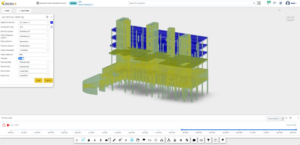
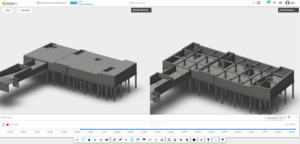
Synchronizing model components with project information brings transparency and predictability to planning. Teams can track activities visually, understand dependencies, and manage work with higher precision.
Enhancing Krion6D Dashboards with Power BI
Power BI acts as a powerful analytics layer on top of Krion6D data, enabling interactive reports and deeper performance analysis. The Krion6D Power BI integration acts as a powerful analytics layer, enabling interactive reports and deeper performance analysis.
Publishing to Power BI

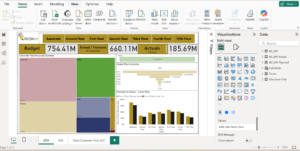
Once a report is developed in Power BI Desktop, it is published to a designated workspace where:
- Teams can access dashboards
- Dataset refreshes are configured
- Permissions are managed
This process is quick and ensures Krion6D data flows into a centralized reporting space.
Minimal Setup for Refresh and Access
After publishing, teams only need to configure a few basics:
- Enable scheduled refresh (where supported)
- Ensure the correct gateway or connection path is available
- Validate user access levels
This allows dashboards to stay updated with minimal management effort.
Turning Dashboards into Live Monitoring Tools
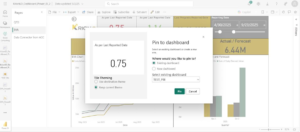
Power BI dashboards allow high-impact indicators — progress metrics, productivity KPIs, cost summaries to be pinned for real-time tracking.
Pinning and Monitoring Key Metrics
Any visual can be pinned to a dashboard, creating a personalized command centre for project leadership or site controls teams.
Setting Up Alerts


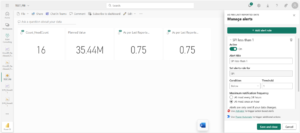
Alerts can be created on card-based visuals so Power BI automatically monitors:
- Threshold breaches
- Delays or performance drops
- Unexpected spikes or deviations
These alerts act as automated “watchers” that continually scan project KPIs.
Adding Automation with Power Automate
Power Automate amplifies the value of alerts by turning dashboard events into instant actions.
Triggering Flows from Power BI Alerts
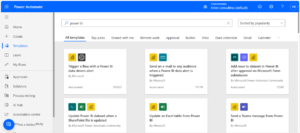
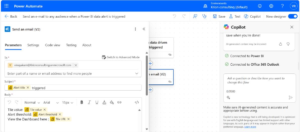
A Power BI alert can trigger a flow in Power Automate through the native action “When a data-driven alert is triggered.” This becomes the starting point for automated workflows.
Automated Actions for Faster Response
Flows can:
- Send email notifications
- Post updates to Teams channels
- Log entries into SharePoint
- Trigger site-action workflows
Messages can dynamically include live KPI values, timestamps, and project names, ensuring clarity and context.
Testing and Deploying
After saving the flow, run a test, verify actions, and confirm alerts are triggering correctly. Once deployed, Krion6D data becomes the catalyst for automated project intelligence.
Why This Integrated Approach Matters
Combining Krion6D with Power BI and Power Automate brings powerful, compounding benefits across your project: The Krion6D Power BI integration brings powerful, compounding benefits across your project.
- Real-Time Insights -Teams always have up-to-date KPIs and progress indicators.
- Automated Workflows – Manual follow-ups, reminders, and escalations are handled automatically.
- Consistent, Centralized Data -Krion6D remains the single source of truth, feeding reliable information into Microsoft’s analytics ecosystem.
- Faster Decision-Making – Issues and deviations are highlighted immediately, enabling proactive action.
- Improved Accountability – Structured workflows, alerts, and audit trails reinforce project governance.
Conclusion
Integrating Krion6D dashboards with Power BI and Power Automate creates a connected, intelligent reporting environment that elevates digital construction management. By uniting advanced analytics with automated workflows, organizations can reduce delays, enhance visibility, and drive smarter project outcomes.
This Krion6D Power BI integration creates a connected, intelligent reporting environment that elevates digital construction management.
This digital synergy empowers construction teams to operate efficiently, confidently, and with greater clarity setting a new benchmark for modern project delivery.
Frequently Asked Questions (FAQ)
Q: What is Krion6D and why should I integrate it with Power BI?
A: Krion6D is a digital construction management platform. Integrating it with Power BI allows teams to build interactive dashboards and reports on top of live project data, enabling deeper analytics, better visibility, and faster decision-making than using Krion6D alone.
Q: Do I need technical expertise to set up this integration?
A: Basic familiarity with Power BI Desktop and Power Automate is helpful, but the setup is designed to be accessible. Publishing a report, configuring scheduled refresh, and setting up alert-triggered flows can all be done through intuitive, low-code interfaces.
Q: How does data refresh work after publishing to Power BI?
A: After publishing, you configure a scheduled refresh in your Power BI workspace. You’ll need to ensure the correct gateway or connection path is available and that user access levels are validated. This keeps your dashboards continuously up to date with minimal manual effort.
Q: What types of alerts can I set up in Power BI?
A: Alerts can be configured on card-based visuals to monitor threshold breaches, delays or performance drops, and unexpected spikes or deviations. These automated “watchers” continuously scan your project KPIs and notify you when something needs attention.
Q: What can Power Automate do when a Power BI alert fires?
A: When an alert triggers, Power Automate can send email notifications, post messages to Microsoft Teams channels, log entries into SharePoint, or trigger site-action workflows. These messages can dynamically include live KPI values, timestamps, and project names for full context.
Q: Is Krion6D still the source of truth in this setup?
A: Yes. Krion6D remains the single, centralized source of truth throughout this integration. Power BI and Power Automate act as the analytics and automation layers on top of it they consume and act on Krion6D data without replacing or duplicating it.
Q: How do I know my automated flows are working correctly?
A: After building a flow in Power Automate, you can run a test to verify each action fires as expected. Confirm that alerts are triggering correctly before going live to ensure reliable, production-ready automation.
Q: What are the main business benefits of this integration?
A: The key benefits include real-time project insights, automated workflows that eliminate manual follow-ups, consistent centralized data, faster decision-making through immediate issue alerts, and improved project governance through structured audit trails and accountability workflows.
About Krion6D
Krion6D is an intelligent Digital Twin and Common Data Environment (CDE) platform that transforms how construction and infrastructure projects come to life connecting every model, process, and person in one unified ecosystem. Designed for the full project lifecycle, Krion6D enables teams to collaborate seamlessly from concept and design through construction, handover, and operations. With powerful capabilities spanning BIM visualization, 4D sequencing, real-time dashboards, document control, QA/QC workflows, and asset management, Krion6D empowers project owners, engineers, contractors, and asset managers to prevent issues before they escalate, make faster data-driven decisions, and optimize performance well beyond project completion. Trusted across infrastructure, real estate, government, and EPC sectors, Krion6D is available on cloud, on-premise, and hybrid deployments giving organizations complete control over their data, compliance, and project outcomes. Visit krion6d.com to learn more.
About Krion Consulting
Krion Consulting Pvt Ltd (formerly KKM Soft Pvt Ltd) is a business process automation and IT consulting company with over 30 years of industry experience, headquartered in Chennai, India. Founded in 1995, Krion Consulting serves the manufacturing, engineering, construction, infrastructure, EPC, automotive, and aerospace sectors, helping organizations transform the way they work through cutting-edge software solutions, digital twin technology, design automation, AI/ML-driven business insights, and industry-focused training. With a team of 100+ professionals operating across Chennai, Bangalore, Delhi, Mumbai, and Coimbatore and expansion planned in Singapore and the USA Krion Consulting has proudly served over 3,000 clients globally. The company is also the creator of Krion6D, its flagship Digital Twin platform that reduces cost and time overruns by enabling smarter project delivery. To explore Krion Consulting’s full suite of solutions, visit krionconsulting.com.